Classes
- Action
- AnimatedSprite
- Application
- BaseRenderTexture
- BaseTexture
- BinaryLoader
- Bounds
- Buffer
- CanvasMaskManager
- CanvasRenderer
- CanvasRenderTarget
- CanvasTinter
- Circle
- Container
- DisplayObject
- Ellipse
- EventEmitter
- Filter
- FilterManager
- Graphics
- GraphicsData
- GraphicsRenderer
- GroupD8
- MaskManager
- Matrix
- ObjectRenderer
- ObservablePoint
- Point
- Polygon
- Quad
- Rectangle
- RenderTarget
- RenderTexture
- RoundedRectangle
- Sprite
- SpriteMaskFilter
- Spritesheet
- StencilManager
- SystemRenderer
- Text
- TextMetrics
- TextStyle
- Texture
- TextureGarbageCollector
- TextureManager
- TextureTransform
- Transform
- TransformBase
- TransformStatic
- Transition
- VideoBaseTexture
- WebGLManager
- WebGLRenderer
- WebGLState
Namespaces
Members
-
static,constantTiny.BLEND_MODESobject
-
Various blend modes supported.
IMPORTANT - The WebGL renderer only supports the NORMAL, ADD, MULTIPLY and SCREEN blend modes.
Anything else will silently act like NORMAL.Properties:
Name Type Description NORMALnumber ADDnumber MULTIPLYnumber SCREENnumber OVERLAYnumber DARKENnumber LIGHTENnumber COLOR_DODGEnumber COLOR_BURNnumber HARD_LIGHTnumber SOFT_LIGHTnumber DIFFERENCEnumber EXCLUSIONnumber HUEnumber SATURATIONnumber COLORnumber LUMINOSITYnumber -
static,constantTiny.configobject
-
默认配置参数
Properties:
Name Type Default Description widthnumber window.innerWidth 宽度
heightnumber window.innerHeight 高度
referWidthnumber 320 基准参考宽度,如:320、375,默认:320
fixSizeBoolean false 是否固定尺寸为传入的宽高
canvasIdstring 'TinyCanvas' canvas的DOM
orientationBoolean 0 横竖屏 [0: 竖屏, 1: 横屏]
dpinumber 1 分辨率
fpsnumber 60 帧频,接受传入:10、20、30、40、50、60
showFPSboolean false 是否显示帧频
renderTypenumber 0 渲染类型 [0: 自动识别, 1: WEBGL, 2: CANVAS]
renderOptionsobject autoRendernumber 1 是否自动渲染 [0: 手动, 1: 自动]
-
static,constantTiny.DATA_URIRegExp string
-
Regexp for data URI.
Based on: https://github.com/ragingwind/data-uri-regexexample
data:image/png;base64 -
static,constanttiny.deg_to_radnumber
-
constant conversion factor for converting degrees to radians
-
static,constanttiny.draw_modesobject
-
various webgl draw modes. these can be used to specify which gl drawmode to use
under certain situations and renderers.properties:
name type description pointsnumber linesnumber line_loopnumber line_stripnumber trianglesnumber triangle_stripnumber triangle_fannumber -
static,constanttiny.gc_modesobject
-
the gc modes that are supported by tiny.
the Tiny.settings.GC_MODE Garbage Collection mode for Tiny textures is AUTO
If set to GC_MODE, the renderer will occasianally check textures usage. If they are not
used for a specified period of time they will be removed from the GPU. They will of course
be uploaded again when they are required. This is a silent behind the scenes process that
should ensure that the GPU does not get filled up.Handy for mobile devices!
This property only affects WebGL.Properties:
Name Type Description AUTOnumber Garbage collection will happen periodically automatically
MANUALnumber Garbage collection will need to be called manually
-
staticTiny.LoaderTiny.loaders.Loader
-
A premade instance of the loader that can be used to load resources.
Example
var resources = [..]; Tiny.Loader.run({ resources: resources, onProgress: function (pre) { console.log("percent:", pre + "%"); }, onAllComplete: function () { console.log('all complete'); Tiny.app.run(new MenuLayer()); } }); -
static,constantTiny.PI_2number
-
Math.PI * 2
-
static,constantTiny.PRECISIONobject
-
Constants that specify float precision in shaders.
Properties:
Name Type Default Description LOWstring 'lowp' MEDIUMstring 'mediump' HIGHstring 'highp' -
static,constantTiny.RAD_TO_DEGnumber
-
Constant conversion factor for converting radians to degrees
-
static,constantTiny.RENDERER_TYPEobject
-
Constant to identify the Renderer Type.
Properties:
Name Type Description UNKNOWNnumber Unknown render type.
WEBGLnumber WebGL render type.
CANVASnumber Canvas render type.
-
static,constantTiny.SCALE_MODESobject
-
The scale modes that are supported.
The Tiny.settings.SCALE_MODE scale mode affects the default scaling mode of future operations.
It can be re-assigned to either LINEAR or NEAREST, depending upon suitability.Properties:
Name Type Description LINEARnumber Smooth scaling
NEARESTnumber Pixelating scaling
-
static,constantTiny.SHAPESobject
-
Constants that identify shapes, mainly to prevent
instanceofcalls.Properties:
Name Type Description POLYnumber Polygon
RECTnumber Rectangle
CIRCnumber Circle
ELIPnumber Ellipse
RRECnumber Rounded Rectangle
-
static,constantTiny.SVG_SIZERegExp string
-
Regexp for SVG size.
Example
<svg width="100" height="100"></svg> -
static,constantTiny.TEXT_GRADIENTobject
-
Constants that define the type of gradient on text.
Properties:
Name Type Description LINEAR_VERTICALnumber Vertical gradient
LINEAR_HORIZONTALnumber Linear gradient
-
static,constantTiny.TRANSFORM_MODEobject
-
Constants that specify the transform type.
Properties:
Name Type Description STATICnumber DYNAMICnumber -
staticTiny.TWEENobject
-
static,constanttiny.update_priorityobject
-
represents the update priorities used by internal tiny classes when registered with
the Tiny.ticker.Ticker object. Higher priority items are updated first and lower
priority items, such as render, should go later.Properties:
Name Type Default Description INTERACTIONnumber 50 Highest priority, used for Tiny.interaction.InteractionManager
HIGHnumber 25 High priority updating, Tiny.VideoBaseTexture and Tiny.AnimatedSprite
NORMALnumber 0 Default priority for ticker events, see Tiny.ticker.Ticker#add.
LOWnumber -25 Low priority used for Tiny.Application rendering.
UTILITYnumber -50 Lowest priority used for Tiny.prepare.BasePrepare utility.
-
static,constantTiny.VERSIONstring
-
String of the current Tiny version.
-
static,constantTiny.WIN_SIZEobject
-
主界面尺寸
Properties:
Name Type Description widthnumber 宽
heightnumber 高
-
static,constantTiny.WRAP_MODESobject
-
The wrap modes that are supported.
The Tiny.settings.WRAP_MODE wrap mode affects the default wraping mode of future operations.
It can be re-assigned to either CLAMP or REPEAT, depending upon suitability.
If the texture is non power of two then clamp will be used regardless as webGL can
only use REPEAT if the texture is po2.This property only affects WebGL.
Properties:
Name Type Description CLAMPnumber The textures uvs are clamped
REPEATnumber The texture uvs tile and repeat
MIRRORED_REPEATnumber The texture uvs tile and repeat with mirroring
Methods
-
staticTiny.arrayRemoveObject(arr, delObj)
-
从数组中移除某个对象
Name Type Description arrarray.<object> delObjobject -
staticTiny.Back(action) ❯ {Tiny.Action}
-
原动作返回
Name Type Description actionTiny.Action Returns:
Type Description Tiny.Action -
staticTiny.Blink(hideDuration, showDuration) ❯ {Tiny.Action}
-
Name Type Description hideDurationnumber showDurationnumber Returns:
Type Description Tiny.Action -
staticTiny.clearTextureCache()
-
Removes all textures from cache, but does not destroy them
-
staticTiny.decomposeDataUri(dataUri) ❯ {DecomposedDataUri|undefined}
-
Split a data URI into components. Returns undefined if parameter
dataUriis not a valid data URI.Name Type Description dataUristring the data URI to check
Returns:
Type Description DecomposedDataUri | undefined The decomposed data uri or undefined -
staticTiny.deg2radian(deg) ❯ {number}
-
角度值转弧度
Name Type Description degReturns:
Type Description number -
staticTiny.destroyTextureCache()
-
Destroys all texture in the cache
-
staticTiny.detect(obj, iterator, context, arg1, arg2) ❯ {boolean}
-
Looks through each value in the list, returning the first one that passes a truth test (predicate), or
undefinedif no value passes the test. The function returns as soon as it finds an acceptable element, and doesn't traverse the entire list.Name Type Description objobject iteratorfunction contextobject arg1arg2Returns:
Type Description boolean Example
var even = Tiny.detect([1, 2, 3, 4, 5, 6], function(num){ return num % 2 == 0; }); //=> 2 -
staticTiny.exports.color2hex(color)
-
转换 color 对象为二进制颜色值
Name Type Description color- Version:
- 1.0.2
Example
var color = Tiny.color(255, 255, 0); var hex = Tiny.color2hex(color); //=> 16776960 //等于 0xffff00 -
staticTiny.FadeIn(duration) ❯ {Tiny.Action}
-
Name Type Description durationnumber Returns:
Type Description Tiny.Action -
staticTiny.FadeOut(duration) ❯ {Tiny.Action}
-
Name Type Description durationnumber Returns:
Type Description Tiny.Action -
staticTiny.FadeTo(duration, to) ❯ {Tiny.Action}
-
Name Type Description durationnumber tonumber Returns:
Type Description Tiny.Action -
staticTiny.getResolutionOfUrl(url, defaultValue) ❯ {number}
-
get the resolution / device pixel ratio of an asset by looking for the prefix
used by spritesheets and image urlsName Type Default Description urlstring the image path
defaultValuenumber 1 optional the defaultValue if no filename prefix is set.
Returns:
Type Description number resolution / device pixel ratio of an asset -
staticTiny.getSvgSize(svgString) ❯ {Size|undefined}
-
Get size from an svg string using regexp.
Name Type Description svgStringstring a serialized svg element
Returns:
Type Description Size | undefined image extension -
staticTiny.getTime() ❯ {number}
-
高精度获取当前时间,比
Date.now()的精度高1000倍,为考虑不同性能场景下的时间获取,建议使用此方法来替代Date.now()。Returns:
Type Description number -
staticTiny.getUrlFileExtension(url) ❯ {string|undefined}
-
Get type of the image by regexp for extension. Returns undefined for unknown extensions.
Name Type Description urlstring the image path
Returns:
Type Description string | undefined image extension -
staticTiny.hex2rgb(hex, out) ❯ {Array.<number>}
-
Converts a hex color number to an [R, G, B] array
Name Type Default Description hexnumber The number to convert
outArray.<number> [] optional If supplied, this array will be used rather than returning a new one
Returns:
Type Description Array.<number> An array representing the [R, G, B] of the color. -
staticTiny.hex2string(hex) ❯ {string}
-
Converts a hex color number to a string.
Name Type Description hexnumber Number in hex
Returns:
Type Description string The string color. -
staticTiny.isArray(obj) ❯ {Boolean}
-
判断对象是否是
Array类型Name Type Description objObject 要判断的对象
Returns:
Type Description Boolean -
staticTiny.isFunction(obj) ❯ {Boolean}
-
判断对象是否是函数类型
Name Type Description objObject 要判断的对象
Returns:
Type Description Boolean -
staticTiny.isMobile() ❯ {object}
-
returns:
type description object -
statictiny.isnumber(obj) ❯ {boolean}
-
判断对象是否是
Number类型Name Type Description objObject 要判断的对象
Returns:
Type Description Boolean -
staticTiny.isObject(obj) ❯ {boolean}
-
判断对象是否是
Object类型Name Type Description objObject 要判断的对象
Returns:
Type Description boolean -
staticTiny.isPixelCollision(first, x, y, isFirstCentred, other, x2, y2, isOtherCentred) ❯ {boolean}
-
像素检测判断是否碰撞
Tiny.js 的这个方法用于JavaScript HTML5 Canvas Image 纯像素级的碰撞检测。
作者是:JOEName Type Description firstTiny.DisplayObject xnumber ynumber isFirstCentredboolean otherTiny.DisplayObject x2number y2number isOtherCentredboolean - See:
Returns:
Type Description boolean -
staticTiny.isString(obj) ❯ {Boolean}
-
判断对象是否是
String类型Name Type Description objObject 要判断的对象
Returns:
Type Description Boolean -
staticTiny.isUndefined(obj) ❯ {boolean}
-
判断对象是否是
Undefined类型Name Type Description objReturns:
Type Description boolean -
staticTiny.isWebGLSupported() ❯ {boolean}
-
Helper for checking for webgl support
Returns:
Type Description boolean is webgl supported -
staticTiny.JumpTo(duration, to, height, times) ❯ {Tiny.Action}
-
Name Type Description durationnumber toobject heightnumber timesnumber Returns:
Type Description Tiny.Action -
staticTiny.MoveBy(duration, to) ❯ {Tiny.Action}
-
Name Type Description durationnumber toobject Name Type Description xnumber ynumber Returns:
Type Description Tiny.Action -
staticTiny.MoveTo(duration, to) ❯ {Tiny.Action}
-
Name Type Description durationnumber toobject Name Type Description xnumber ynumber Returns:
Type Description Tiny.Action -
staticTiny.pluginTarget(obj)
-
Mixins functionality to make an object have "plugins".
Name Type Description objobject The object to mix into.
Example
function MyObject() {} pluginTarget.mixin(MyObject); -
staticTiny.point(x, y) ❯ {object}
-
转化坐标值
Name Type Description xnumber ynumber 如果不传,则等于 x
Returns:
Type Description object Example
Tiny.point(100, 200); //=> {x: 100, y: 200} -
staticTiny.radian2deg(radian) ❯ {number}
-
弧度值转角度
Name Type Description radianReturns:
Type Description number -
staticTiny.random(min, max) ❯ {number}
-
生成数字区间内的随机整型数据
Name Type Description minmaxReturns:
Type Description number Example
Tiny.random(10, 18); //=> 15 -
staticTiny.randomBool(chance) ❯ {boolean}
-
生成随机的
Boolean类型数据Name Type Description chancenumber 生成 true 的几率,默认值:0.5
Returns:
Type Description boolean -
staticTiny.randomFloat(min, max) ❯ {number}
-
返回区间内的随机浮点类型数字
Name Type Description minmaxReturns:
Type Description number -
staticTiny.randomFromArray(arr) ❯ {object}
-
随机返回数组中的任意对象
Name Type Description arrarray.<object> Returns:
Type Description object -
staticTiny.randomInt() ❯ {boolean}
-
Tiny.random的别名Returns:
Type Description boolean -
staticTiny.randomPM(chance) ❯ {number}
-
随机生成 {-1, 1} 两个值
Name Type Description chancenumber 生成 -1 的几率,默认值:0.5
Returns:
Type Description number Example
Tiny.randomPM(0.8); //=> -1 -
staticTiny.rectContainsPoint(rect, point) ❯ {boolean}
-
检测一个点是否在一个显示对象内部
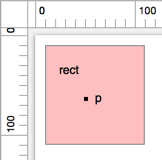
注意:边缘重叠始终返回fasle
Name Type Description rectTiny.Rectangle pointTiny.Point Returns:
Type Description boolean Example
var rect = new Tiny.Rectangle(10, 10, 50, 50); var p = new Tiny.Point(49, 62); Tiny.rectContainsPoint(rect, p); //=> true -
staticTiny.rectContainsRect(rect1, rect2) ❯ {boolean}
-
检测一个显示对象是否在另一个显示对象内部
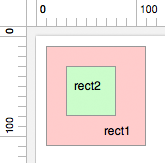
注意:边缘重叠始终返回fasle
Name Type Description rect1Tiny.Rectangle rect2Tiny.Rectangle Returns:
Type Description boolean Example
var rect1 = new Tiny.Rectangle(10, 10, 100, 100); var rect2 = new Tiny.Rectangle(30, 30, 50, 50); Tiny.rectContainsRect(rect1, rect2); //=> true -
staticTiny.rectGetMaxX(rect) ❯ {number}
-
获取显示对象的横向最大值
Name Type Description rectTiny.Rectangle Returns:
Type Description number -
staticTiny.rectGetMaxY(rect) ❯ {number}
-
获取显示对象的纵向最大值
Name Type Description rectTiny.Rectangle Returns:
Type Description number -
staticTiny.rectGetMidX(rect) ❯ {number}
-
获取显示对象的横向中心值
Name Type Description rectTiny.Rectangle Returns:
Type Description number -
staticTiny.rectGetMidY(rect) ❯ {number}
-
获取显示对象的纵向中心值
Name Type Description rectTiny.Rectangle Returns:
Type Description number -
staticTiny.rectGetMinX(rect) ❯ {number}
-
获取显示对象的横向最小值
Name Type Description rectTiny.Rectangle Returns:
Type Description number -
staticTiny.rectGetMinY(rect) ❯ {number}
-
获取显示对象的纵向最小值
Name Type Description rectTiny.Rectangle Returns:
Type Description number -
staticTiny.rectIntersectsRect(rectA, rectB) ❯ {boolean}
-
检测两个显示对象是否相交,一般用于检测碰撞
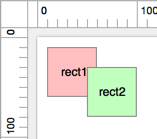
注意:边缘重叠始终返回true
Name Type Description rectATiny.Rectangle rectBTiny.Rectangle Returns:
Type Description boolean Example
var rect1 = new Tiny.Rectangle(10, 10, 50, 50); var rect2 = new Tiny.Rectangle(50, 30, 50, 50); Tiny.rectIntersectsRect(rect1, rect2); //=> true -
staticTiny.rectUnion(rectA, rectB) ❯ {Tiny.Rectangle}
-
返回两个显示对象的总区域
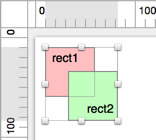
Name Type Description rectATiny.Rectangle rectBTiny.Rectangle Returns:
Type Description Tiny.Rectangle Example
var rect1 = new Tiny.Rectangle(10, 10, 50, 50); var rect2 = new Tiny.Rectangle(33, 34, 50, 50); Tiny.rectUnion(rect1, rect2); //=> Tiny.Rectangle(10, 10, 73, 74) -
staticTiny.removeItems(arr, startIdx, removeCount) ❯ {object}
-
Name Type Description arrarray.<object> 源数组
startIdxnumber 起始位
removeCountnumber 移除的数量
returns:
type description object example
const arr = [1, 2, 3, 4, 5, 6, 7, 8, 9]; removeitems(arr, 3, 4); //=> [1, 2, 3, 8, 9] -
statictiny.repeat(times, action, delay) ❯ {Tiny.Action}
-
重复
Name Type Description timesnumber 重复次数
actionTiny.Action 要重复的 Action
delaynumber 延迟(ms)
Returns:
Type Description Tiny.Action -
staticTiny.RepeatForever(action, delay) ❯ {Tiny.Action}
-
永久重复
Name Type Description actionTiny.Action 要重复的 Action
delaynumber 延迟(ms)
Returns:
Type Description Tiny.Action -
staticTiny.rgb2hex(rgb) ❯ {number}
-
Converts a color as an [R, G, B] array to a hex number
Name Type Description rgbArray.<number> rgb array
Returns:
Type Description number The color number -
staticTiny.RotateBy(duration, to) ❯ {Tiny.Action}
-
Name Type Description durationnumber toobject Name Type Description rotationnumber Returns:
Type Description Tiny.Action -
staticTiny.RotateTo(duration, to) ❯ {Tiny.Action}
-
Name Type Description durationnumber toobject Name Type Description rotationnumber Returns:
Type Description Tiny.Action -
staticTiny.scale(x, y) ❯ {object}
-
转化缩放值
Name Type Description xnumber ynumber 如果不传,则等于 x
Returns:
Type Description object Example
Tiny.scale(2, 1.5); //=> {scaleX: 2, scaleY: 1.5} -
staticTiny.ScaleBy(duration, to) ❯ {Tiny.Action}
-
Name Type Description durationnumber toobject Name Type Description scaleXobject scaleYobject Returns:
Type Description Tiny.Action -
staticTiny.ScaleTo(duration, to) ❯ {Tiny.Action}
-
Name Type Description durationnumber toobject Name Type Description scaleXobject scaleYobject Returns:
Type Description Tiny.Action -
staticTiny.sign(n) ❯ {number}
-
Returns sign of number
Name Type Description nnumber the number to check the sign of
Returns:
Type Description number 0 if nis 0, -1 ifnis negative, 1 ifnis positive -
staticTiny.TintBy(duration, color) ❯ {Tiny.Action}
-
注意:差值计算时,R、G、B三个通道,无论加减多少,最后的结果最少是0,最多是255。
Name Type Description durationnumber colornumber | Tiny.color 此处的 color 虽然是 Tiny.color 类型,但是并不代表某个色值,而是色值与色值直接要做的差值
Returns:
Type Description Tiny.Action Example
var action = Tiny.TintBy(1000, Tiny.color(-85, 0, 85)); sprite.runAction(action); //=> sprite.tint 等于 0xaaffff(即:[170, 255, 255]) -
staticTiny.TintTo(duration, color) ❯ {Tiny.Action}
-
Name Type Description durationnumber colornumber | Tiny.color Returns:
Type Description Tiny.Action Examples
var action = Tiny.TintTo(1000, 0xFFFF00);
sprite.tint = 0xFF0000;
sprite.runAction(action);
// [255, 102, 0] 即橙色(#FF6600) var action = Tiny.TintTo(1000, Tiny.color(255, 102, 0)); sprite.runAction(action); -
staticTiny.uid() ❯ {number}
-
Gets the next unique identifier
Returns:
Type Description number The next unique identifier to use.